
Customer Quick
Reference
GRS Multifactor
Authentication FAQ
As part of Liberty Mutual's ongoing commitment to enhance security and protect your account, we have enabled Multifactor Authentication (MFA).
Troubleshooting
If you encounter any issues with accessing your account, please take one or more of the following actions:
- Browser: Microsoft Edge is the recommended browser.
- Cache: If you have not logged in for some time, you may need to clear your cache/cookies before logging in.
- Username/ID: Ensure you are logging in with your own unique ID, as ID sharing is no longer allowed
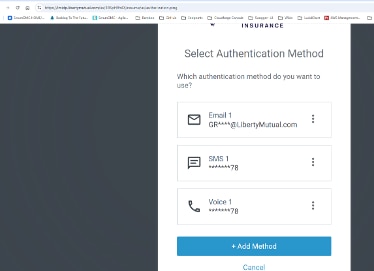
- Email
and/or Phone number: Verify the information of the associated account
is what you expect. When the multi-factor authentication screens come up,
verify the first 2 letters of your personal company email address, and/or
the last 2 digits of your phone align with what is being presented in the
authentication screens.
If you still encounter any issues or are unsure of your user ID or password, you may reach out to support for the application you are trying to access:
- Provider
Support Center (PSC)
- Bill Information: Call 1-800-500-7044 (8am - 8pm EST)
- iCaseManager (iCM)
- GRS
Portal (assigned risk, midsize, large accounts, Report a claim, Risktrac)
- Customers/Brokers
- Injured Worker Portal